In this guide4 chapters
Greenbet APK Download and Installation on Android
On Android, you install Greenbet from an APK file on the official website. You download the file, allow the install once and tap Install.
An APK is the standard installation file for Android apps. Google Play uses the same format behind the scenes. Here you just do the steps yourself.
| Step | Where | What you do |
|---|---|---|
| 1 | greenbet.gg | Tap Download |
| 2 | Settings | Allow installs from your browser |
| 3 | Downloads | Open the APK file |
| 4 | Install window | Tap Install, then Open |
APK File Download from the Greenbet Website
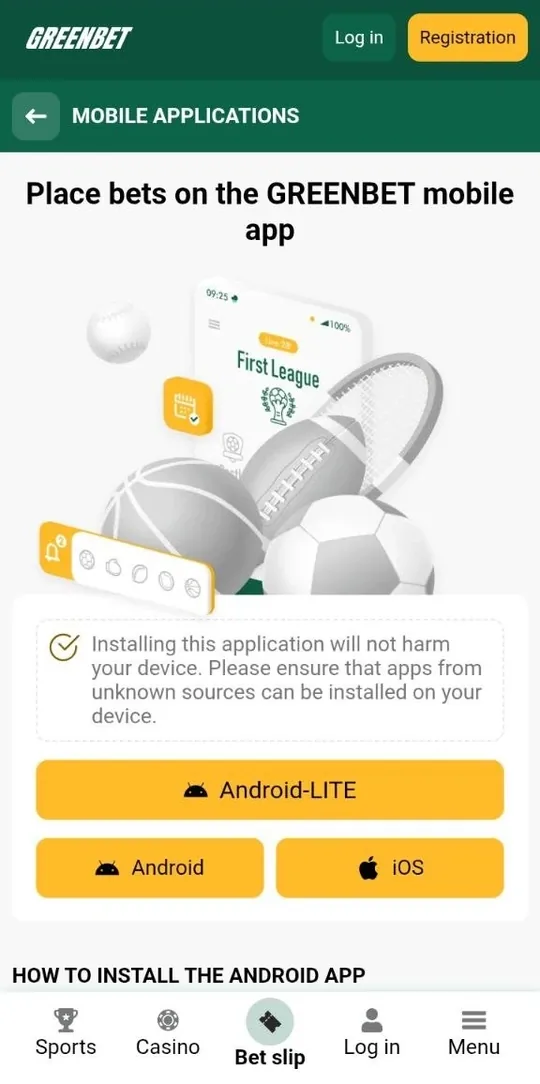
Grab the APK directly from greenbet.gg. Greenbet distributes it only there, which keeps things simple.
- Open your phone's browser.
- Go to greenbet.gg.
- Find the mobile app page and tap Download.
- Wait until the file lands in your Downloads folder.
Your browser might show a warning about the file type. Don't worry. Android shows that message for every APK from outside Google Play. Just check that the address bar says greenbet.gg before you confirm.
Permission to Install Apps from Unknown Sources
Android blocks installs from outside Google Play by default. You give your browser permission once and you're set.
- Open Settings.
- Find "Install unknown apps".
- Pick the browser you used for the download.
- Turn on "Allow from this source".
Every phone brand hides this setting in a slightly different place. Sometimes it's under Security, sometimes under Apps. The quickest way is to type "unknown apps" in the Settings search bar.
The permission only applies to that one browser. Everything else on your phone stays locked down. Once Greenbet is installed, you can switch it off again if you like. The app keeps working.
APK Installation and First Launch Steps
Now open the APK, tap Install and launch the app. You'll see the Greenbet login screen in seconds.
- Open your Downloads folder or the download notification.
- Tap the Greenbet file.
- Tap Install.
- Wait for "App installed".
- Tap Open.
The Greenbet icon now sits on your home screen. On the first launch, you can sign up or log in right away. Tick "Remember me" when you log in, and next time the app opens straight to your account.
Greenbet Web App Installation on iPhone and iPad
On iPhone and iPad, Greenbet works as a progressive web app. You add it to your home screen through Safari. No App Store, no download, no waiting.
A progressive web app (PWA) is a website saved to your home screen. It has its own icon and opens in its own window, just like a regular app.
| What you get | Greenbet on iOS |
|---|---|
| Home screen icon | Yes |
| App Store download | Not needed |
| Space on your phone | Almost none |
| Updates | Automatic with the website |
Add to Home Screen Through the Safari Share Menu
Open greenbet.gg in Safari, tap Share and choose "Add to Home Screen". Three taps and you're done.
- Open greenbet.gg in Safari.
- Wait until the page has fully loaded.
- Tap the Share button at the bottom. It looks like a square with an arrow pointing up.
- Scroll down and select "Add to Home Screen".
- Tap Add in the upper right corner.
Here's a tip: let the page load completely before you tap Share. If you're too quick, iOS may save a half-loaded page with a plain icon. Wait for the Greenbet logo and the menu to appear first.
After you tap Add, the Greenbet icon shows up on your home screen. Tap it and the site opens without the Safari address bar. That's how you know the web app is working.
Registration and Login Inside the Greenbet App
The Greenbet app gives you the same registration and login options as the website. One account works everywhere, so you can switch between phone and computer anytime.
| Action | Options in the app |
|---|---|
| Registration | One-click, By phone, By e-mail, Social networks |
| Bonus choice | Bonus for sports, Casino + Games, Reject bonuses |
| Login | Email or ID, phone, SMS code, Telegram, Google, X |
Four Registration Methods Available in the App
You can sign up in the app in four ways: One-click, By phone, By e-mail or through Telegram, Google or X.
| Method | What you fill in |
|---|---|
| One-click | Country and currency |
| By phone | Phone number and SMS code |
| By e-mail | Name, surname, email in three steps |
| Social networks | Your Telegram, Google or X account |
One-click is the fastest. You check two fields and tap REGISTER. Save your account ID and password right after, because that's your login.
Phone registration is a great pick on mobile. The SMS code arrives on the same phone, so you can enter it in a second. Plus, your number gets verified on the spot. You'll need that for your bonus.
Before you tap REGISTER, make sure the consent checkbox is ticked. It confirms the Terms and Conditions, the Privacy Policy and your legal age.
Bonus Type Selection During Registration in the App
The registration form in the app lets you pick your welcome bonus. You've got three options.
| Option | What you get |
|---|---|
| Bonus for sports | 100% on your first deposit, up to $100 |
| Casino + Games | Up to $1,750 + 150 free spins over four deposits |
| Reject bonuses | No welcome bonus for now |
The sports bonus needs a minimum deposit of just $1. You wager it five times in accumulator bets. The casino package starts with 100% up to $375 and 30 free spins on your first deposit of $10 or more.
To get your bonus, complete two steps before your first deposit:
- Fill in all fields in your profile.
- Confirm your phone number by SMS.
Choose a regular currency for your account if you want a bonus. Greenbet bonuses don't apply to cryptocurrency accounts. Also keep in mind that rejecting bonuses switches off all other promotions too.
Login with Password, SMS Code or Social Network Account
The app has four login tabs: By email, By phone, By code and Social networks.
- Tap LOG IN.
- Pick the tab that matches how you signed up.
- Enter your details.
- Tap the yellow LOG IN button.
By code is the handiest option on a phone. Enter your number, tap "Send via SMS" and type in the code. No password needed. It only works with a verified number, which also keeps your account safe.
The password field has an eye icon. Tap it to check what you typed. If you forget your password, the "Forgot your password?" link sits right under the LOG IN button.
Frequently Asked Questions
Here are quick answers to the questions players ask most about the app.
Is the Greenbet app available in Google Play or the App Store?
No. You download the Android app from greenbet.gg, and on iPhone you add the web app through Safari.
Is it safe to install the Greenbet APK from unknown sources?
Yes, as long as you download it from greenbet.gg. Avoid Greenbet APK files from any other website.
Can I use one Greenbet account on the app and the website?
Yes. One account works on the Android app, the iOS web app and the website.
Why does the Greenbet app not install on my Android device?
Most often, the unknown sources permission is off for your browser. Turn it on in Settings and open the APK again.
Does the Greenbet app have a separate welcome bonus?
No, the app uses the same bonuses as the website. You pick sports or casino during registration.
How do I update the Greenbet app to the latest version?
The iOS web app updates automatically. On Android, download the latest APK from greenbet.gg.